Roadside cabinets take a beating. Between temperature swings, moisture, vibration from passing traffic, and the ever-present risk of lightning-induced surges, the equipment inside (traffic controllers, PoE switches, cameras, and communication gear) is under constant stress. A well-designed cabinet doesn't just house these components; it protects them, simplifies maintenance, and extends the life of the entire ITS system.
Surge protection is a critical piece of that puzzle, but it's only one piece. Here's how experienced Intelligent Transportation System (ITS) engineers approach cabinet design holistically.
Cabinet Layout and Cable Routing
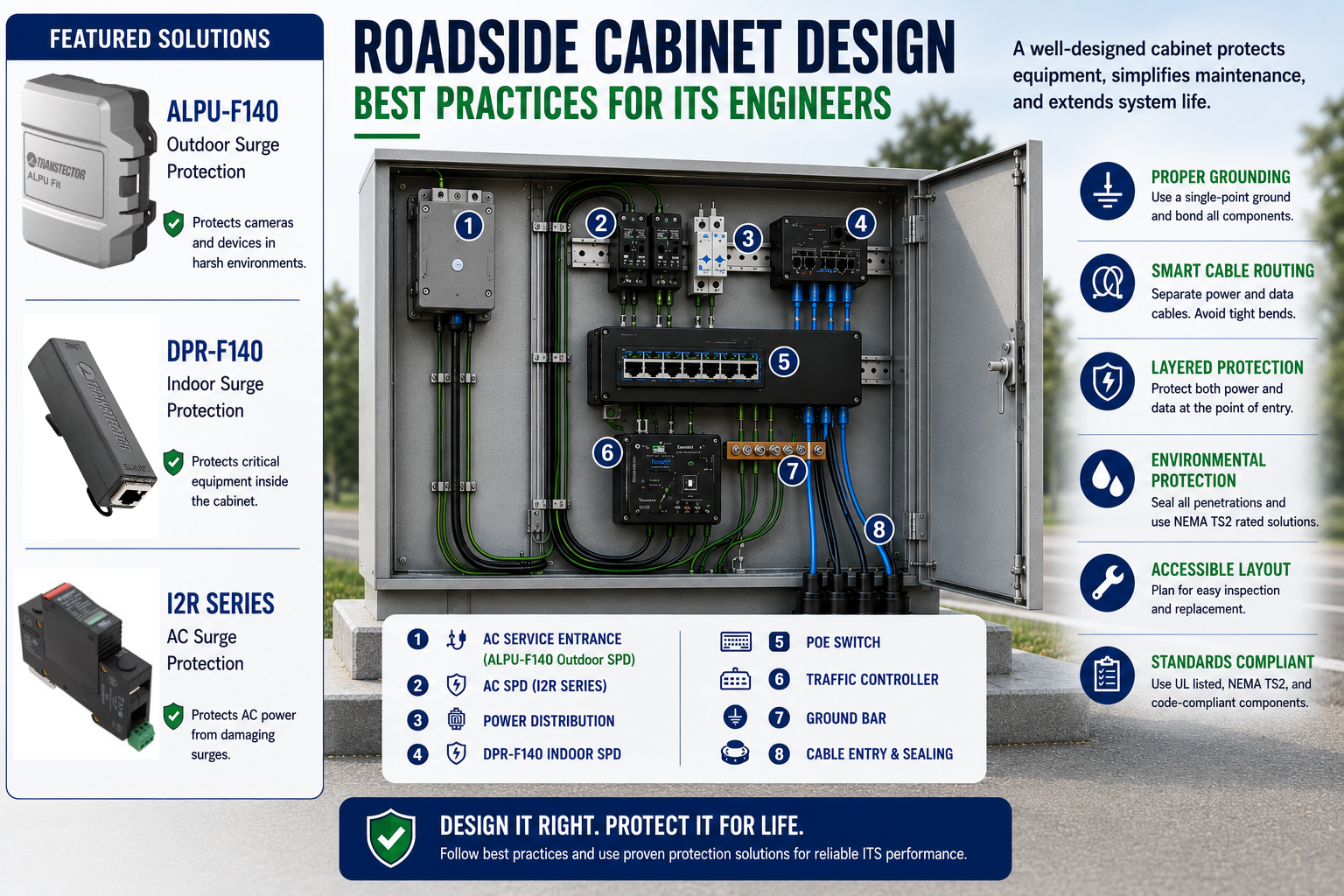
Good cabinet design begins before a single device is mounted. As shown in the diagram above, power and data cables should be physically separated wherever possible - running them together invites electrical noise and interference that can degrade signal quality or interfere with sensitive controller electronics.
A few habits that pay off over the life of the cabinet:
- Avoid tight bends in cable runs, which stress conductors and connectors over time
- Use consistent, vertical routing paths so technicians can trace a cable at a glance
- Label everything - future maintenance is only as fast as your documentation
Grounding Best Practices
Grounding is one of those things that's invisible when done right and catastrophic when it isn't. Every metal enclosure, rail, and protective device should bond back to a single-point ground (callout 7 in the diagram). Inconsistent or multi-point grounding creates ground loops and voltage differentials that surge protection devices can't fully compensate for ,no matter how good the SPD is, it's only as effective as the ground it's tied to.
A dedicated ground bar, positioned where cables enter the cabinet, gives every circuit a short, direct path to ground and makes inspection straightforward.
Placement of Surge Protection Devices
Surge protection isn't a single device,it's a strategy. As the diagram illustrates, the most resilient cabinets protect power at the point of entry (1) and again at distribution and equipment level (2, 4), rather than relying on one device to do everything.
A typical layered approach looks like:
- AC service entrance protection - the first line of defense against surges arriving on the utility feed
- AC SPD at the distribution point - protects downstream power distribution before it reaches equipment
- Indoor surge protection at the equipment level - a second layer guarding the controller, switch, or camera itself
This is where Transtector's product family comes in:
- ALPU-F140 - Outdoor-rated surge protection built for harsh environments, ideal for protecting cameras and field devices exposed to the elements. Shown at the AC service entrance in the diagram.
- DPR-F140 -Indoor surge protection designed to guard critical equipment inside the cabinet, adding a second layer of defense behind the outdoor SPD.
- I2R Series (AC Surge Protection) -DIN-rail mounted AC SPDs that protect single-phase power distribution from damaging surges before they ever reach sensitive electronics. Where higher-performance AC protection is needed, APEX-series solutions extend this same layered philosophy.
Protecting Both Power and Data Circuits
It's easy to focus surge protection efforts on power and overlook data. But Ethernet and PoE lines running to the switch and controller (5, 6) are just as vulnerable to induced surges - and a damaged data line can take down a camera or controller just as effectively as a power surge. Protecting both power and data at the point of entry, rather than one or the other, is what separates a cabinet that survives a storm season from one that doesn't.
Maintenance and Long-Term Reliability
A cabinet that's hard to service becomes a cabinet that doesn't get serviced. Accessible layout matters:
- Leave room around components for a technician to inspect, test, and swap devices without disturbing neighboring equipment
- Group similar functions together (power distribution, switching, controller) rather than scattering them
- Use components that are UL listed, NEMA TS2 rated, and code-compliant - this isn't just a compliance checkbox, it's what ensures replacement parts and future upgrades integrate cleanly
- Seal all cable entry points (8) against moisture and dust - a surge protector can't do its job if corrosion has already compromised the circuit it's meant to protect
Building It Right, From the Ground Up
A resilient roadside cabinet isn't the result of any single product - it's the result of disciplined design: separated cable runs, single-point grounding, layered protection across both power and data, accessible layout, and environmental sealing, all built on standards-compliant components.
Transtector's ALPU-F140, DPR-F140, and I2R Series are built to fit into that layered strategy - but they work best as part of a cabinet designed with resilience in mind from the start.
Design it right. Protect it for life.
Frequently Asked Questions (FAQs)
What should be considered when designing a roadside ITS cabinet?
Roadside ITS cabinet design should account for cable routing, grounding and bonding, surge protection, environmental sealing, equipment accessibility, and compliance with applicable standards. Protection should address both power and data circuits.
Where should surge protection be installed in an ITS roadside cabinet?
Surge protection is typically applied in layers, with protection at the incoming power service and additional protection closer to downstream equipment. The appropriate configuration depends on the cabinet design, electrical system, and equipment being protected.
Do roadside ITS cabinets need surge protection for data lines?
Yes. Ethernet and PoE circuits can be vulnerable to induced surges, particularly when cables run between indoor equipment and outdoor cameras or other field devices. Data-line protection should be considered alongside AC power protection.
How should cables be routed inside an ITS cabinet?
Power and data cables should be physically separated where practical, with organized routing paths, appropriate bend radii, and clear labeling. Good cable management helps reduce interference and makes troubleshooting and maintenance easier.
Why is grounding important in roadside cabinets?
Proper grounding and bonding provide effective paths for fault and surge currents and help minimize unwanted voltage differences between conductive components. Surge protective devices also depend on properly designed, low-impedance grounding and bonding paths.
How can roadside ITS cabinets be designed for easier maintenance?
Leave adequate working space around components, group equipment by function, use clear labeling, maintain organized cable routing, and provide accessible grounding and surge protection components. These practices make inspection, troubleshooting, and equipment replacement easier.